

Note
Go to the end to download the full example code.
2D tomography#
Fan-beam and parallel-beam 2D problems, as one-slice 3D problems.
Source: Python/demos/d16_2Dtomography.py · MATLAB/Demos/d16_2Dtomography.m
MATLAB version of this demo
%% DEMO 16: TIGRE 2D tomography
%
%
%  In demo we show how to do 2D tomography in TIGRE. It is exactly the same
%  as 3D.
%
%
%
%--------------------------------------------------------------------------
%--------------------------------------------------------------------------
% This file is part of the TIGRE Toolbox
%
% Copyright (c) 2015, University of Bath and
%                     CERN-European Organization for Nuclear Research
%                     All rights reserved.
%
% License:            Open Source under BSD.
%                     See the full license at
%                     https://github.com/CERN/TIGRE/blob/master/LICENSE
%
% Contact:            tigre.toolbox@gmail.com
% Codes:              https://github.com/CERN/TIGRE/
% Coded by:           Ander Biguri
%--------------------------------------------------------------------------
%% Initialize
clear;
close all;
%% PARALLEL BEAM 2D

% VARIABLE                                   DESCRIPTION                    UNITS
%-------------------------------------------------------------------------------------
geo.DSD = 1536;                             % Distance Source Detector      (mm)
geo.DSO = 1000;                             % Distance Source Origin        (mm)
% Detector parameters

%
% 1- Make the detector Nx1
% 2- Make the image NxMx1


% Image parameters
geo.nVoxel=[256;256;1];                   % number of voxels              (vx)
geo.sVoxel=[256;256;1];                   % total size of the image       (mm)
geo.dVoxel=geo.sVoxel./geo.nVoxel;          % size of each voxel            (mm)

geo.nDetector=[512;  1];					% number of pixels              (px)
geo.dDetector=[0.8; geo.dVoxel(3)]; 					% size of each pixel            (mm)
geo.sDetector=geo.nDetector.*geo.dDetector; % total size of the detector    (mm)

% MAKE SURE THAT THE DETECTOR PIXELS SIZE IN V IS THE SAME AS THE IMAGE!

% Offsets
geo.offOrigin =[0;0;0];                     % Offset of image from origin   (mm)
geo.offDetector=[0; 0];


% Auxiliary
geo.accuracy=0.5;                           % Accuracy of FWD proj          (vx/sample)
geo.mode='parallel';
%% Define angles of projection and load phantom image

angles=linspace(0,2*pi,100);
phantom=single(phantom('Modified Shepp-Logan',geo.nVoxel(1)));
projections=Ax(phantom,geo,angles);
%% reconstruct

imgOSSART=OS_SART(projections,geo,angles,40);
imgASDPOCS=ASD_POCS(projections,geo,angles,40);

%% Plot
plotImg([imgOSSART;imgASDPOCS ],'Dim',3,'Slice',1); %top is ASD_POCS, bottom OSSART


%%
%%
%% And now Fan Beam
%%
% The same thing!

%% FAN BEAM 2D

% VARIABLE                                   DESCRIPTION                    UNITS
%-------------------------------------------------------------------------------------
geo.DSD = 1536;                             % Distance Source Detector      (mm)
geo.DSO = 1000;                             % Distance Source Origin        (mm)
% Detector parameters

% Image parameters
geo.nVoxel=[256;256;1];                   % number of voxels              (vx)
geo.sVoxel=[256;256;1];                   % total size of the image       (mm)
geo.dVoxel=geo.sVoxel./geo.nVoxel;          % size of each voxel            (mm)

geo.nDetector=[512;  1];					% number of pixels              (px)
geo.dDetector=[0.8; 1]; 					% size of each pixel            (mm)
geo.sDetector=geo.nDetector.*geo.dDetector; % total size of the detector    (mm)

% Offsets
geo.offOrigin =[0;0;0];                        % Offset of image from origin   (mm)              ;
geo.offDetector=[0; 0];

% Auxiliary
geo.accuracy=0.5;                           % Accuracy of FWD proj          (vx/sample)
geo.mode='cone';
%% Define angles of projection and load phantom image

angles=linspace(0,2*pi,100);
phantom=single(phantom('Modified Shepp-Logan',geo.nVoxel(1)));
% phantom=cat(3,phantom,phantom);
projections=Ax(phantom,geo,angles,'interpolated');
%% reconstruct

imgOSSART=OS_SART(projections,geo,angles,40);
% in 2D, the TV norm minimization happens in CPU, this causes the
% algorithms to be slower
imgASDPOCS=ASD_POCS(projections,geo,angles,40);

%% Plot
plotImg([imgOSSART;imgASDPOCS ],'Dim',3,'Slice',1); %top is ASD_POCS, nottom OSSART
Initialize#
import tigre
import numpy as np
from tigre.utilities import sample_loader
from tigre.utilities import CTnoise
import tigre.algorithms as algs
2D Parallel beam#
# VARIABLE                                   DESCRIPTION                    UNITS

# HERE COMES THE TRICK.
#
# 1- Make the detector Nx1 (instead of 1)
# 2- Make the image NxMx1  (instead of 1)

geo = tigre.geometry()
# VARIABLE                                   DESCRIPTION                    UNITS
# -------------------------------------------------------------------------------------
# Distances
geo.DSD = 1536  # Distance Source Detector      (mm)
geo.DSO = 1000  # Distance Source Origin        (mm)
# Image parameters
geo.nVoxel = np.array([1, 256, 256])  # number of voxels              (vx)
geo.sVoxel = np.array([1, 256, 256])  # total size of the image       (mm)
geo.dVoxel = geo.sVoxel / geo.nVoxel  # size of each voxel            (mm)
# Detector parameters
geo.nDetector = np.array([1, 512])  # number of pixels              (px)
geo.dDetector = np.array([geo.dVoxel[0], 0.8])  # size of each pixel            (mm)
geo.sDetector = geo.nDetector * geo.dDetector  # total size of the detector    (mm)
# Offsets
geo.offOrigin = np.array([0, 0, 0])  # Offset of image from origin   (mm)
geo.offDetector = np.array([0, 0])  # Offset of Detector            (mm)
# MAKE SURE THAT THE DETECTOR PIXELS SIZE IN V IS THE SAME AS THE IMAGE!

geo.mode = "parallel"
Define angles of projection and load phantom image#
angles = np.linspace(0, 2 * np.pi, 100, endpoint=False)
head = sample_loader.load_head_phantom(geo.nVoxel)
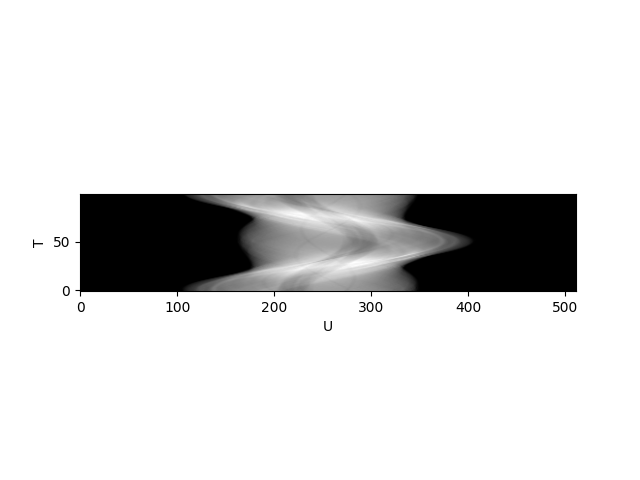
projections = tigre.Ax(head, geo, angles)
tigre.plotSinogram(projections, 0)
reconstruct#
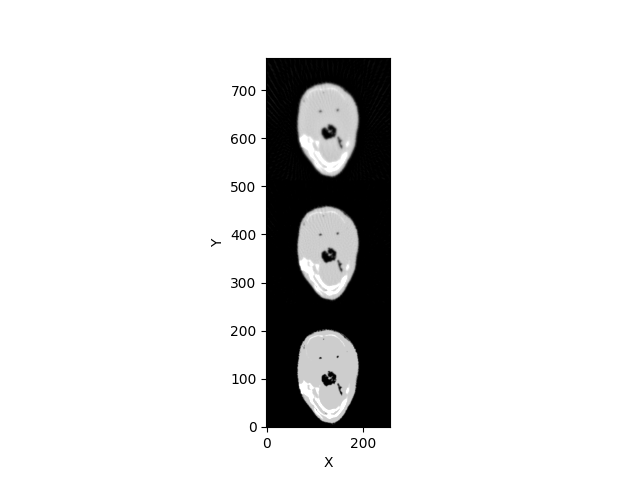
imgOSSART = algs.ossart(projections, geo, angles, 40)
imgCGLS = algs.cgls(projections, geo, angles, 40)
OSSART algorithm in progress.
Estimated time until completion : 00:00:00
Algorithm will finish at        : 16:55:27
CGLS algorithm in progress.
Estimated time until completion : 00:00:00
Algorithm will finish at        : 16:55:28
Average time taken for each iteration for CGLS:0.0049770874989917505(s)
Plot#
tigre.plotimg(np.concatenate([head, imgOSSART, imgCGLS], axis=1), dim="z", slice=0, clims=[0, 0.5])
And now Fan Beam#
##
# The same thing! Just remember to offset the detector half a pixel, so its
# centered (this is a bug, it will be changed at some point)

## FAN BEAM 2D
geo = tigre.geometry()
# VARIABLE                                   DESCRIPTION                    UNITS
# -------------------------------------------------------------------------------------
# Distances
geo.DSD = 1536  # Distance Source Detector      (mm)
geo.DSO = 1000  # Distance Source Origin        (mm)
# Image parameters
geo.nVoxel = np.array([1, 256, 256])  # number of voxels              (vx)
geo.sVoxel = np.array([1, 256, 256])  # total size of the image       (mm)
geo.dVoxel = geo.sVoxel / geo.nVoxel  # size of each voxel            (mm)
# Detector parameters
geo.nDetector = np.array([1, 512])  # number of pixels              (px)
geo.dDetector = np.array([geo.dVoxel[0], 0.8])  # size of each pixel            (mm)
geo.sDetector = geo.nDetector * geo.dDetector  # total size of the detector    (mm)
# Offsets
geo.offOrigin = np.array([0, 0, 0])  # Offset of image from origin   (mm)
geo.offDetector = np.array([0, 0])  # Offset of Detector            (mm)
# MAKE SURE THAT THE DETECTOR PIXELS SIZE IN V IS THE SAME AS THE IMAGE!

geo.mode = "cone"
Define angles of projection and load phantom image#
angles = np.linspace(0, 2 * np.pi, 100, endpoint=False)
head = sample_loader.load_head_phantom(geo.nVoxel)
projections = tigre.Ax(head, geo, angles)
reconstruct#
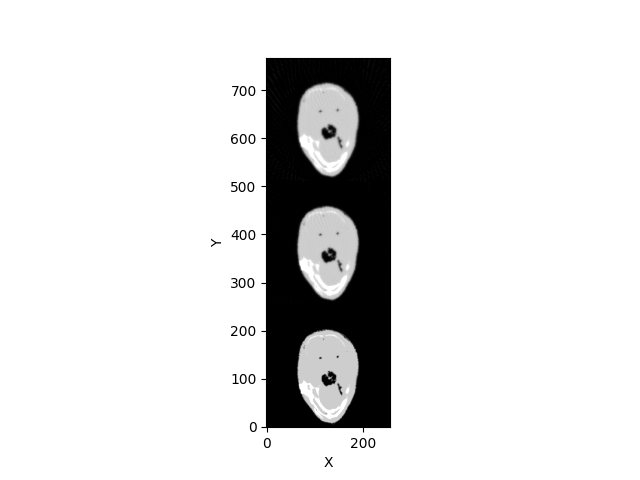
imgOSSART = algs.ossart(projections, geo, angles, 40)
imgCGLS = algs.cgls(projections, geo, angles, 40)
OSSART algorithm in progress.
Estimated time until completion : 00:00:00
Algorithm will finish at        : 16:55:29
CGLS algorithm in progress.
Estimated time until completion : 00:00:00
Algorithm will finish at        : 16:55:29
re-initilization of CGLS called at iteration:1
Estimated time until completion : 00:00:01
Algorithm will finish at        : 16:55:30
re-initilization of CGLS called at iteration:2
re-initilization of CGLS called at iteration:3
re-initilization of CGLS called at iteration:4
re-initilization of CGLS called at iteration:5
re-initilization of CGLS called at iteration:6
re-initilization of CGLS called at iteration:7
re-initilization of CGLS called at iteration:8
re-initilization of CGLS called at iteration:9
re-initilization of CGLS called at iteration:10
re-initilization of CGLS called at iteration:11
re-initilization of CGLS called at iteration:12
re-initilization of CGLS called at iteration:13
re-initilization of CGLS called at iteration:14
re-initilization of CGLS called at iteration:15
re-initilization of CGLS called at iteration:16
re-initilization of CGLS called at iteration:17
re-initilization of CGLS called at iteration:18
re-initilization of CGLS called at iteration:19
re-initilization of CGLS called at iteration:20
re-initilization of CGLS called at iteration:21
re-initilization of CGLS called at iteration:22
re-initilization of CGLS called at iteration:23
re-initilization of CGLS called at iteration:24
re-initilization of CGLS called at iteration:25
re-initilization of CGLS called at iteration:26
re-initilization of CGLS called at iteration:27
re-initilization of CGLS called at iteration:28
re-initilization of CGLS called at iteration:29
re-initilization of CGLS called at iteration:30
re-initilization of CGLS called at iteration:31
re-initilization of CGLS called at iteration:32
re-initilization of CGLS called at iteration:33
re-initilization of CGLS called at iteration:34
re-initilization of CGLS called at iteration:35
re-initilization of CGLS called at iteration:36
re-initilization of CGLS called at iteration:37
re-initilization of CGLS called at iteration:38
re-initilization of CGLS called at iteration:39
Average time taken for each iteration for CGLS:0.004182805063510962(s)
Plot#
tigre.plotimg(np.concatenate([head, imgOSSART, imgCGLS], axis=1), dim="z", slice=0, clims=[0, 0.5])
Total running time of the script: (0 minutes 3.700 seconds)