

Note
Go to the end to download the full example code.
Describe the scanner geometry#
Create a cone-beam geometry field by field, and the default geometries that save typing. See Describing your scanner: the geometry.
Source: Python/demos/d01_CreateGeometry.py · MATLAB/Demos/d01_CreateGeometry.m
MATLAB version of this demo
%% DEMO 01: Describing your geometry
%
%  In TIGRE the geometry is stored in an structure. To see documentation
%  about geometry, run:
%
%     doc('TIGRE/Geometry')
%
%--------------------------------------------------------------------------
%--------------------------------------------------------------------------
% This file is part of the TIGRE Toolbox
%
% Copyright (c) 2015, University of Bath and
%                     CERN-European Organization for Nuclear Research
%                     All rights reserved.
%
% License:            Open Source under BSD.
%                     See the full license at
%                     https://github.com/CERN/TIGRE/blob/master/LICENSE
%
% Contact:            tigre.toolbox@gmail.com
% Codes:              https://github.com/CERN/TIGRE/
% Coded by:           Ander Biguri
%--------------------------------------------------------------------------
%%  Geometry definition
%
%                  Detector plane, behind
%              |-----------------------------|
%              |                             |
%              |                             |
%              |                             |
%  Centered    |                             |
%    at O      A V    +--------+             |
%              |     /        /|             |
%     A Z      |    /        / |*D           |
%     |        |   +--------+  |             |
%     |        |   |        |  |             |
%     |        |   |     *O |  +             |
%     *--->y   |   |        | /              |
%    /         |   |        |/               |
%   V X        |   +--------+        U       |
%              .--------------------->-------|
%
%            *S
%
%
%% Geometry structure:
%           -nVoxel:        3x1 matrix of number of voxels in the image
%           -sVoxel:        3x1 matrix with the total size in mm of the image
%           -dVoxel:        3x1 matrix with the size of each of the voxels in mm
%           -nDetector:     2x1 matrix of number of voxels in the detector plane
%           -sDetector:     2x1 matrix with the total size in mm of the detector
%           -dDetector:     2x1 matrix with the size of each of the pixels in the detector in mm
%           -DSD:           1x1 scalar value. Distance Source Detector, in mm
%           -DSO:           1x1 scalar value. Distance Source Origin.
%           -offOrigin:     3x1 matrix with the offset in mm of the centre of the image from the origin.
%           -offDetector:   2x1 matrix with the offset in mm of the centre
%           of the detector from the x axis

% Shows Geometry diagram
showGeoCBCTDiagram();

%% Example
%
%
%
% VARIABLE                                   DESCRIPTION                    UNITS
%-------------------------------------------------------------------------------------
% Distances
geo.DSD = 1536;                             % Distance Source Detector      (mm)
geo.DSO = 1000;                             % Distance Source Origin        (mm)
% Detector parameters
geo.nDetector=[512; 512];					% number of pixels              (px)
geo.dDetector=[0.8; 0.8]; 					% size of each pixel            (mm)
geo.sDetector=geo.nDetector.*geo.dDetector; % total size of the detector    (mm)
% Image parameters
geo.nVoxel=[256;256;256];                   % number of voxels              (vx)
geo.sVoxel=[256;256;256];                   % total size of the image       (mm)
geo.dVoxel=geo.sVoxel./geo.nVoxel;          % size of each voxel            (mm)
% Offsets
geo.offOrigin =[0;0;0];                     % Offset of image from origin   (mm)
geo.offDetector=[0; 0];                     % Offset of Detector            (mm)
                                            % These two can be also defined
                                            % per angle

% Auxiliary
geo.accuracy=0.5;                           % Variable to define accuracy of
                                            % 'interpolated' projection
                                            % It defines the amount of
                                            % samples per voxel.
                                            % Recommended <=0.5             (vx/sample)

% Optional Parameters
% There is no need to define these unless you actually need them in your
% reconstruction


geo.COR=0;                                  % y direction displacement for
                                            % centre of rotation
                                            % correction                   (mm)
                                            % This can also be defined per
                                            % angle

geo.rotDetector=[0;0;0];                    % Rotation of the detector, by
                                            % X,Y and Z axis respectively. (rad)
                                            % This can also be defined per
                                            % angle

geo.mode='cone';                            % Or 'parallel'. Geometry type.

%% Alternatively, you can generate default geometries as:

geoCone=defaultGeometry();
geoCone=defaultGeometry('mode','cone');
geoCone=defaultGeometry('nVoxel',[64;64;128]);
geoCone=defaultGeometry('nDetector',[512;128]);
geoParallel=defaultGeometry('mode','parallel');
% etc
%% Plot the geometry

plotgeometry(geo,-pi/6);
Import statements#
import tigre
import numpy as np
Geometry definition#
#
#                  Detector plane, behind
#              |-----------------------------|
#              |                             |
#              |                             |
#              |                             |
#  Centered    |                             |
#    at O      A V    +--------+             |
#              |     /        /|             |
#     A Z      |    /        / |*D           |
#     |        |   +--------+  |             |
#     |        |   |        |  |             |
#     |        |   |     *O |  +             |
#     *--->y   |   |        | /              |
#    /         |   |        |/               |
#   V X        |   +--------+        U       |
#              .--------------------->-------|
#
#            *S
#
#
# An image of the geometry can be found at DOI: 10.1088/2057-1976/2/5/055010
# or simply at: https://i.imgur.com/mRweux3.png
Geometry class#
#           -nVoxel:        3x1 array of number of voxels in the image
#           -sVoxel:        3x1 array with the total size in mm of the image
#           -dVoxel:        3x1 array with the size of each of the voxels in mm
#           -nDetector:     2x1 array of number of voxels in the detector plane
#           -sDetector:     2x1 array with the total size in mm of the detector
#           -dDetector:     2x1 array with the size of each of the pixels in the detector in mm
#           -DSD:           1x1 or 1xN array. Distance Source Detector, in mm
#           -DSO:           1x1 or 1xN array. Distance Source Origin.
#           -offOrigin:     3x1 or 3xN array with the offset in mm of the centre of the image from the origin.
#           -offDetector:   2x1 or 2xN array with the offset in mm of the centre of the detector from the x axis
#           -rotDetector:   3x1 or 3xN array with the rotation in roll-pitch-yaw of the detector
Example#
#
# Lets create a geometry object
geo = tigre.geometry()
# VARIABLE                                   DESCRIPTION                    UNITS
# -------------------------------------------------------------------------------------
# Distances
geo.DSD = 1536  # Distance Source Detector      (mm)
geo.DSO = 1000  # Distance Source Origin        (mm)
# Detector parameters
geo.nDetector = np.array([512, 512])  # number of pixels              (px)
geo.dDetector = np.array([0.8, 0.8])  # size of each pixel            (mm)
geo.sDetector = geo.nDetector * geo.dDetector  # total size of the detector    (mm)
# Image parameters
geo.nVoxel = np.array([256, 256, 256])  # number of voxels              (vx)
geo.sVoxel = np.array([256, 256, 256])  # total size of the image       (mm)
geo.dVoxel = geo.sVoxel / geo.nVoxel  # size of each voxel            (mm)
# Offsets
geo.offOrigin = np.array([0, 0, 0])  # Offset of image from origin   (mm)
geo.offDetector = np.array([0, 0])  # Offset of Detector            (mm)
# These two can be also defined
# per angle

# Auxiliary
geo.accuracy = 0.5  # Variable to define accuracy of
# 'interpolated' projection
# It defines the amount of
# samples per voxel.
# Recommended <=0.5             (vx/sample)

# Optional Parameters
# There is no need to define these unless you actually need them in your
# reconstruction

geo.COR = 0  # y direction displacement for
# centre of rotation
# correction                   (mm)
# This can also be defined per
# angle

geo.rotDetector = np.array([0, 0, 0])  # Rotation of the detector, by
# X,Y and Z axis respectively. (rad)
# This can also be defined per
# angle

geo.mode = "cone"  # Or 'parallel'. Geometry type.
Print the Geometry#
print(geo)
TIGRE parameters
-----
Geometry parameters
Distance from source to detector (DSD) = 1536 mm
Distance from source to origin (DSO)= 1000 mm
-----
Detector parameters
Number of pixels (nDetector) = [512 512]
Size of each pixel (dDetector) = [0.8 0.8] mm
Total size of the detector (sDetector) = [409.6 409.6] mm
-----
Image parameters
Number of voxels (nVoxel) = [256 256 256]
Total size of the image (sVoxel) = [256 256 256] mm
Size of each voxel (dVoxel) = [1. 1. 1.] mm
-----
Offset correction parameters
Offset of image from origin (offOrigin) = [0 0 0] mm
Offset of detector (offDetector) = [0 0] mm
-----
Auxillary parameters
Samples per pixel of forward projection (accuracy) = 0.5
-----
Rotation of the Detector (rotDetector) = [0 0 0] rad
-----
Centre of rotation correction (COR) = 0 mm
Alternatively,#
# # if you are just experimenting with TIGRE and you dont care too much about the geometry, you can generate default geometries as:
geo = tigre.geometry_default()  # Default cone beam geometry
geo = tigre.geometry(
    mode="cone", default=True
)  # default=True calculates all parameters for the geometry for you, so you can do:
geo = tigre.geometry(
    mode="cone", default=True, nVoxel=np.array([256, 256, 256])
)  # This will calculate a reasonable geometry for this number of voxels
geo = tigre.geometry(
    mode="cone", default=True, high_resolution=True
)  # high_resolution will result on an image 512^3, while false will result on a 128^3 image. nVoxel overrides these values.
geo = tigre.geometry(
    mode="parallel", nVoxel=np.array([512, 512, 512])
)  # Parallel beam geometry does not require anything other than the image size.
Plot your geometry#
geo = tigre.geometry_default()  # Default cone beam geometry
tigre.plot_geometry(geo, angle=-np.pi / 6)
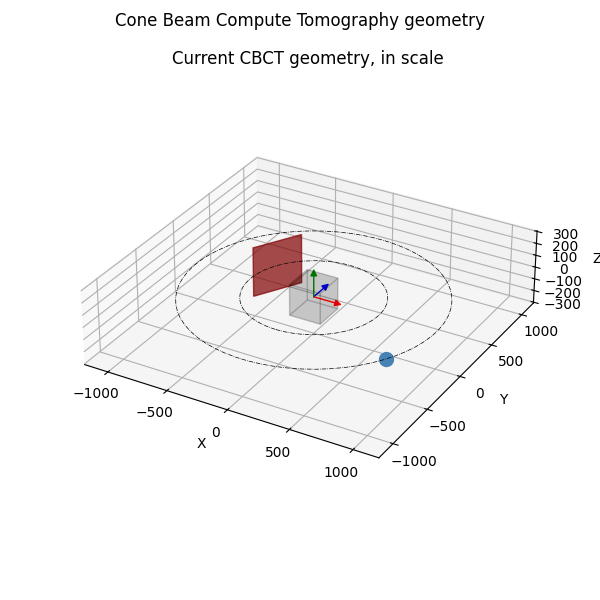
sDetector = [409.6 409.6]
detector=Rectangle(xy=(-204.8, -204.8), width=409.6, height=409.6, angle=0)
Total running time of the script: (0 minutes 0.758 seconds)